Sharing NSbasic CE code with Visual Basic 5On the Chapter 1 of NSbasic CE manual you read that....
" It (the language) implements all the commonly used BASIC statements.............."
Reading the above, much time before the publishing of the NSbasic Desk program, i thought that
it should be possible share code between the two Basic Languages.
It is obvious that, if there is no relevant problem to use the VB IDE to write standard code that can
be used in the NSbasic CE IDE you need anyway the NSbasic to be able to run it on the CE unit.
As now we can use a Desktop version of NSB somebody can ask why use the VB ide instead of Desk
program.First i have to say that the NSbasic Desk is a good program and the ability to write code
for CE directly on desk can show what good job the NSB guys done.
But the program is still too young to be use extensively and you have to wait a new version to obtain
a more efficient program.
So may be still interesting to try to use VB to write the code.
If you try to use Visual Basic ( i use vers.5.0 but i assume you can use the preious version also) you
get this:
1) a code that with few adjustments works on CE and Window (and two separate equal programs if
you like).
2) a better way to debug your routine than using the NSbasic IDE.
3) the possibility to syncronize the two programs simply sharing the data files using Active Sync.
All the above is possible because NSbasic is a sort of subset of VB instructions and objects and use
in many case the same syntax. What really differs is the way to design the Form that you must create
using the relative O.S. but with the same object names and dimensions.
Remember also that you must use 'Standard code'.
This means that you must forget the use of object and/or instructions that are not available in both
the languages while in same cases it will be necessary to use segment of code that equalize the use
the functions of your code.
The above mentioned code sample will be added here to help who like to try this programming way.
Some program of mine, that you find here, are samples (MsgWiz, NSmsgWiz and the RemMe ) of
what i am saying.
-
To do this i shall detail herewith how develop a real code's segment of an application.
What can we develop ?
The starting point of any project, as previously said is the graphic user interface, so we may start to
create a form that equalize the use of both the language.
Always start to create the form using Visual Basic.
Using VB you can do any change you wish or totally redesign your first attempt if you need.
To use Visual Designer in NSbasic is very easy but it should require you much more time owing to
the small screen to prototype the form that you need.
The form will contain several objects as CommandButton, ComboBox, TextBox, Labels etc. and in
the sample it will be like the following:
It is abvious that to create a form like this in Visual Basic is very quick and easy. Simply select the
object double click it and then drag it on its position.
If you need an objects' array (labels and textbox in this case) create the object and copy the same
in the form several times.
Later you can change their positions and dimensions if requested.
Using NSbasic you should add some code to obtain a form that works like the one above.
First think about to use Visual Designer or not. If you use the Visual tool it will be similar to VB to
create the common objects (buttons, combo) and you will get also the code, authomatically written
to show and hide the form.
As, anyway, the objects' arrays are not recognized by Visual designer i prefere to write my code
directly (if i do not need to hide the form).
The sintax to add an object in NSbasic is the following:
ADDOBJECT " {Object type}", "{Object name}", T, L, W, H
where T is Top, L is Left, W is width and H is Heigth of the object.
So to add the first button you have to write:
ADDOBJECT "CommandButton","Button1",0,0,100,18
You get so a rectangle that works like a button.
If you want to change the color of the object you have to write under the creation code' line the
list of its properties as follows.
Button1.BackColor = vbGray (for example) and so on for the other properties.
In the same way you can create now the remaing buttons and add the combo box also (Object type
is ComboBox).
The final code will be so:
Dim vbGray
ADDOBJECT "CommandButton","Button1",0,0,100,18
Button1.BackColor = vbGray
'--------------------
ADDOBJECT "ComboBox","Combo1",135,0,100,18
'--------------------
ADDOBJECT "CommandButton","Button2",0,250,100,18
Button1.BackColor = vbGray
'-------------------
ADDOBJECT "CommandButton","Button3",135,250,100,18
Button1.BackColor = vbGray
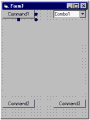
If you wrote on your CE unit (palm version in this case) the few line of code that you see here ,
running them by NSbasic, you should see on the screen the following image:
The remaining missing objects required to be added to use some more lines of code.
NSbasic supports the objects' array but to get it and to be able to use the same features that the
equal object offer under Visual Basic.
You may use to ways to get the code you need.
First see on the NSbasic handlebook that show a sample using Option Buttons or you may use my
program NSassist that will help you writing the full code for you.
If you do not like the above mentioned ways, you can find herein the code in question:
Dim Vc,Oc
Vc=20:Oc=0
Dim I,Alabel(4)
For I = 0 to UBOUND(Alabel)
ADDOBJECT "Label","Alabel" & I,0+ ( I * Oc ),84+ ( I * Vc ),50,18
EXECUTE("SET Alabel(" & I & ") = Alabel" & I)
EXECUTE("SUB Alabel"& I &"_Click" _
& vbCrLf & "Alabel_Click("& I &")" _
& vbCrLf &"END SUB")
Alabel( I ).BackColor = vbRed
Alabel( I ).FontBold = True
Alabel( I ).BorderStyle=1
Alabel( I ).Caption=""
Next
You can modify Alabel( I ).Caption to get for each label its own caption.
Obviously by the same way you can use TextBox, CommandButtons, Option or CheckBox.
The only problem with the above code is that you can display objects by vertical or horizontal line
only and in this case all the objects have the same dimensions.
The code previously quoted allow you to use on NSbasic also the objects'
array but using this type of objects in Visual Basic not only you get an
index to recall and add code to any object created but allows you also to
modify dimensions and position of each object.
The current code segment does not allow these performances.
If we wish therefore get this ability we have to modify our code as follows to create our second
objects'array:
Dim Blabel(4)
Dim PosLab,PosLbl,x,p,z, y
Dim L,T,W,H
y=0
PosLab="70,84,50,18|70,104,100,18|70,124,125,18|70,144,50,18|70,164,150,18"
I=0
Do While Len(PosLab)
z=Instr(PosLab + "|","|")
PosLbl=Left(PosLab,z-1)
x=0
Do While Len(PosLbl)
p=Instr(PosLbl + ",",",")
If x=0 Then L=Left(PosLbl,p-1)
If x=1 Then T=Left(PosLbl,p-1)
If x=2 Then W=Left(PosLbl,p-1)
If x=3 Then H=Left(PosLbl,p-1)
PosLbl=Mid(PosLbl,p+1):x=x+1
Loop
ADDOBJECT "Label","Blabel" & y ,L,T,W,H
EXECUTE("SET Blabel(" & y & ") = Blabel" & y)
EXECUTE("SUB Blabel"& y &"_Click" _
& vbCrLf & "Blabel_Click("& y &")" _
& vbCrLf &"END SUB")
Blabel( y ).FontBold = True
Blabel( y ).BorderStyle=1
Blabel( y ).Caption=""
PosLab = Mid(PosLab, z + 1):y=y+1
Loop
The above code will create for you an array of Labels for which you can can change the single
dimensions and position simply changing the value in the "PosLab" string. (you may use obviously
others objects also)
You now have two forms (VB and NSbasicCE) that allow you to use the same unctions on both
the system enabling you to write a common program with few further adjustments.
If you do not like to copy the code the full code text file is HERE
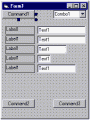 It is abvious that to create a form like this in Visual Basic is very quick and easy. Simply select the
object double click it and then drag it on its position.
If you need an objects' array (labels and textbox in this case) create the object and copy the same
in the form several times.
Later you can change their positions and dimensions if requested.
Using NSbasic you should add some code to obtain a form that works like the one above.
First think about to use Visual Designer or not. If you use the Visual tool it will be similar to VB to
create the common objects (buttons, combo) and you will get also the code, authomatically written
to show and hide the form.
As, anyway, the objects' arrays are not recognized by Visual designer i prefere to write my code
directly (if i do not need to hide the form).
The sintax to add an object in NSbasic is the following:
ADDOBJECT " {Object type}", "{Object name}", T, L, W, H
where T is Top, L is Left, W is width and H is Heigth of the object.
So to add the first button you have to write:
ADDOBJECT "CommandButton","Button1",0,0,100,18
You get so a rectangle that works like a button.
If you want to change the color of the object you have to write under the creation code' line the
list of its properties as follows.
Button1.BackColor = vbGray (for example) and so on for the other properties.
In the same way you can create now the remaing buttons and add the combo box also (Object type
is ComboBox).
The final code will be so:
Dim vbGray
ADDOBJECT "CommandButton","Button1",0,0,100,18
Button1.BackColor = vbGray
'--------------------
ADDOBJECT "ComboBox","Combo1",135,0,100,18
'--------------------
ADDOBJECT "CommandButton","Button2",0,250,100,18
Button1.BackColor = vbGray
'-------------------
ADDOBJECT "CommandButton","Button3",135,250,100,18
Button1.BackColor = vbGray
If you wrote on your CE unit (palm version in this case) the few line of code that you see here ,
running them by NSbasic, you should see on the screen the following image:
It is abvious that to create a form like this in Visual Basic is very quick and easy. Simply select the
object double click it and then drag it on its position.
If you need an objects' array (labels and textbox in this case) create the object and copy the same
in the form several times.
Later you can change their positions and dimensions if requested.
Using NSbasic you should add some code to obtain a form that works like the one above.
First think about to use Visual Designer or not. If you use the Visual tool it will be similar to VB to
create the common objects (buttons, combo) and you will get also the code, authomatically written
to show and hide the form.
As, anyway, the objects' arrays are not recognized by Visual designer i prefere to write my code
directly (if i do not need to hide the form).
The sintax to add an object in NSbasic is the following:
ADDOBJECT " {Object type}", "{Object name}", T, L, W, H
where T is Top, L is Left, W is width and H is Heigth of the object.
So to add the first button you have to write:
ADDOBJECT "CommandButton","Button1",0,0,100,18
You get so a rectangle that works like a button.
If you want to change the color of the object you have to write under the creation code' line the
list of its properties as follows.
Button1.BackColor = vbGray (for example) and so on for the other properties.
In the same way you can create now the remaing buttons and add the combo box also (Object type
is ComboBox).
The final code will be so:
Dim vbGray
ADDOBJECT "CommandButton","Button1",0,0,100,18
Button1.BackColor = vbGray
'--------------------
ADDOBJECT "ComboBox","Combo1",135,0,100,18
'--------------------
ADDOBJECT "CommandButton","Button2",0,250,100,18
Button1.BackColor = vbGray
'-------------------
ADDOBJECT "CommandButton","Button3",135,250,100,18
Button1.BackColor = vbGray
If you wrote on your CE unit (palm version in this case) the few line of code that you see here ,
running them by NSbasic, you should see on the screen the following image:
 The remaining missing objects required to be added to use some more lines of code.
NSbasic supports the objects' array but to get it and to be able to use the same features that the
equal object offer under Visual Basic.
You may use to ways to get the code you need.
First see on the NSbasic handlebook that show a sample using Option Buttons or you may use my
program NSassist that will help you writing the full code for you.
If you do not like the above mentioned ways, you can find herein the code in question:
Dim Vc,Oc
Vc=20:Oc=0
Dim I,Alabel(4)
For I = 0 to UBOUND(Alabel)
ADDOBJECT "Label","Alabel" & I,0+ ( I * Oc ),84+ ( I * Vc ),50,18
EXECUTE("SET Alabel(" & I & ") = Alabel" & I)
EXECUTE("SUB Alabel"& I &"_Click" _
& vbCrLf & "Alabel_Click("& I &")" _
& vbCrLf &"END SUB")
Alabel( I ).BackColor = vbRed
Alabel( I ).FontBold = True
Alabel( I ).BorderStyle=1
Alabel( I ).Caption=""
Next
You can modify Alabel( I ).Caption to get for each label its own caption.
Obviously by the same way you can use TextBox, CommandButtons, Option or CheckBox.
The only problem with the above code is that you can display objects by vertical or horizontal line
only and in this case all the objects have the same dimensions.
The code previously quoted allow you to use on NSbasic also the objects'
array but using this type of objects in Visual Basic not only you get an
index to recall and add code to any object created but allows you also to
modify dimensions and position of each object.
The current code segment does not allow these performances.
If we wish therefore get this ability we have to modify our code as follows to create our second
objects'array:
Dim Blabel(4)
Dim PosLab,PosLbl,x,p,z, y
Dim L,T,W,H
y=0
PosLab="70,84,50,18|70,104,100,18|70,124,125,18|70,144,50,18|70,164,150,18"
I=0
Do While Len(PosLab)
z=Instr(PosLab + "|","|")
PosLbl=Left(PosLab,z-1)
x=0
Do While Len(PosLbl)
p=Instr(PosLbl + ",",",")
If x=0 Then L=Left(PosLbl,p-1)
If x=1 Then T=Left(PosLbl,p-1)
If x=2 Then W=Left(PosLbl,p-1)
If x=3 Then H=Left(PosLbl,p-1)
PosLbl=Mid(PosLbl,p+1):x=x+1
Loop
ADDOBJECT "Label","Blabel" & y ,L,T,W,H
EXECUTE("SET Blabel(" & y & ") = Blabel" & y)
EXECUTE("SUB Blabel"& y &"_Click" _
& vbCrLf & "Blabel_Click("& y &")" _
& vbCrLf &"END SUB")
Blabel( y ).FontBold = True
Blabel( y ).BorderStyle=1
Blabel( y ).Caption=""
PosLab = Mid(PosLab, z + 1):y=y+1
Loop
The above code will create for you an array of Labels for which you can can change the single
dimensions and position simply changing the value in the "PosLab" string. (you may use obviously
others objects also)
You now have two forms (VB and NSbasicCE) that allow you to use the same unctions on both
the system enabling you to write a common program with few further adjustments.
If you do not like to copy the code the full code text file is HERE
The remaining missing objects required to be added to use some more lines of code.
NSbasic supports the objects' array but to get it and to be able to use the same features that the
equal object offer under Visual Basic.
You may use to ways to get the code you need.
First see on the NSbasic handlebook that show a sample using Option Buttons or you may use my
program NSassist that will help you writing the full code for you.
If you do not like the above mentioned ways, you can find herein the code in question:
Dim Vc,Oc
Vc=20:Oc=0
Dim I,Alabel(4)
For I = 0 to UBOUND(Alabel)
ADDOBJECT "Label","Alabel" & I,0+ ( I * Oc ),84+ ( I * Vc ),50,18
EXECUTE("SET Alabel(" & I & ") = Alabel" & I)
EXECUTE("SUB Alabel"& I &"_Click" _
& vbCrLf & "Alabel_Click("& I &")" _
& vbCrLf &"END SUB")
Alabel( I ).BackColor = vbRed
Alabel( I ).FontBold = True
Alabel( I ).BorderStyle=1
Alabel( I ).Caption=""
Next
You can modify Alabel( I ).Caption to get for each label its own caption.
Obviously by the same way you can use TextBox, CommandButtons, Option or CheckBox.
The only problem with the above code is that you can display objects by vertical or horizontal line
only and in this case all the objects have the same dimensions.
The code previously quoted allow you to use on NSbasic also the objects'
array but using this type of objects in Visual Basic not only you get an
index to recall and add code to any object created but allows you also to
modify dimensions and position of each object.
The current code segment does not allow these performances.
If we wish therefore get this ability we have to modify our code as follows to create our second
objects'array:
Dim Blabel(4)
Dim PosLab,PosLbl,x,p,z, y
Dim L,T,W,H
y=0
PosLab="70,84,50,18|70,104,100,18|70,124,125,18|70,144,50,18|70,164,150,18"
I=0
Do While Len(PosLab)
z=Instr(PosLab + "|","|")
PosLbl=Left(PosLab,z-1)
x=0
Do While Len(PosLbl)
p=Instr(PosLbl + ",",",")
If x=0 Then L=Left(PosLbl,p-1)
If x=1 Then T=Left(PosLbl,p-1)
If x=2 Then W=Left(PosLbl,p-1)
If x=3 Then H=Left(PosLbl,p-1)
PosLbl=Mid(PosLbl,p+1):x=x+1
Loop
ADDOBJECT "Label","Blabel" & y ,L,T,W,H
EXECUTE("SET Blabel(" & y & ") = Blabel" & y)
EXECUTE("SUB Blabel"& y &"_Click" _
& vbCrLf & "Blabel_Click("& y &")" _
& vbCrLf &"END SUB")
Blabel( y ).FontBold = True
Blabel( y ).BorderStyle=1
Blabel( y ).Caption=""
PosLab = Mid(PosLab, z + 1):y=y+1
Loop
The above code will create for you an array of Labels for which you can can change the single
dimensions and position simply changing the value in the "PosLab" string. (you may use obviously
others objects also)
You now have two forms (VB and NSbasicCE) that allow you to use the same unctions on both
the system enabling you to write a common program with few further adjustments.
If you do not like to copy the code the full code text file is HERE