Starting to  program using both languages (1st part )


This is a good opportunity to clarify to myself also the ideas i am trying.      Starting to program.2
To do this i shall detail herewith how develop a real code's segment of       Starting to program.3
an application.

What can we develop ?
The starting point of any project, as previously said is the graphic user
interface, so we may start to create a form that equalize the use of both
the language

Always start to create the form using Visual Basic.
Using VB you can do any change you wish or totally redesign your first
attempt if you need. To use Visual Designer in NSbasic is very easy but
it should require you much more time owing to the small screen to
prototype the form that you need.

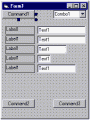
The form will contain several objects as CommandButton, ComboBox,
TextBox, Labels etc. and in the sample it will be like the following:
 It is abvious that to create a form like this in Visual Basic
is very quick and easy. Simply select the object double click it and then
drag it on its position. If you need an objects' array (labels and textbox
in this case) create the object and copy the same in the form several times.
Later you can change their positions and dimensions if requested.

Using NSbasic you should add some code to obtain a form that works like
the one above.
First think about to use Visual Designer or not. If you use the Visual tool
it will be similar to VB to create the common objects (buttons, combo)
and you will get also the code, authomatically written to show and hide
the form.
As, anyway, the objects' arrays are not recognized by Visual designer i
prefere to write my code directly (if i do not need to hide the form).

The sintax to add an object in NSbasic is the following:
ADDOBJECT " {Object type}", "{Object name}", T, L, W, H
where T is Top, L is Left, W is width and H is Heigth of the object.
So to add the first button you have to write:

ADDOBJECT "CommandButton","Button1",0,0,100,18

You get so a rectangle that works like a button. If you want to change the
color of the object you have to write under the creation code' line the
list of its properties as follows.

Button1.BackColor = vbGray   (for example)

and so on for the other properties.
In the same way you can create now the remaing buttons and add the
combo box also (Object type is ComboBox).

The final code will be so:

Dim vbGray

ADDOBJECT "CommandButton","Button1",0,0,100,18
Button1.BackColor = vbGray
'--------------------
ADDOBJECT "ComboBox","Combo1",135,0,100,18
'--------------------
ADDOBJECT "CommandButton","Button2",0,250,100,18
Button1.BackColor = vbGray
'-------------------
ADDOBJECT "CommandButton","Button3",135,250,100,18
Button1.BackColor = vbGray


<<< Tips Index
 This is a good opportunity to clarify to myself also the ideas i am trying. Starting to program.2
To do this i shall detail herewith how develop a real code's segment of Starting to program.3
an application.
What can we develop ?
The starting point of any project, as previously said is the graphic user
interface, so we may start to create a form that equalize the use of both
the language
Always start to create the form using Visual Basic.
Using VB you can do any change you wish or totally redesign your first
attempt if you need. To use Visual Designer in NSbasic is very easy but
it should require you much more time owing to the small screen to
prototype the form that you need.
The form will contain several objects as CommandButton, ComboBox,
TextBox, Labels etc. and in the sample it will be like the following:
This is a good opportunity to clarify to myself also the ideas i am trying. Starting to program.2
To do this i shall detail herewith how develop a real code's segment of Starting to program.3
an application.
What can we develop ?
The starting point of any project, as previously said is the graphic user
interface, so we may start to create a form that equalize the use of both
the language
Always start to create the form using Visual Basic.
Using VB you can do any change you wish or totally redesign your first
attempt if you need. To use Visual Designer in NSbasic is very easy but
it should require you much more time owing to the small screen to
prototype the form that you need.
The form will contain several objects as CommandButton, ComboBox,
TextBox, Labels etc. and in the sample it will be like the following:
 It is abvious that to create a form like this in Visual Basic
is very quick and easy. Simply select the object double click it and then
drag it on its position. If you need an objects' array (labels and textbox
in this case) create the object and copy the same in the form several times.
Later you can change their positions and dimensions if requested.
Using NSbasic you should add some code to obtain a form that works like
the one above.
First think about to use Visual Designer or not. If you use the Visual tool
it will be similar to VB to create the common objects (buttons, combo)
and you will get also the code, authomatically written to show and hide
the form.
As, anyway, the objects' arrays are not recognized by Visual designer i
prefere to write my code directly (if i do not need to hide the form).
The sintax to add an object in NSbasic is the following:
ADDOBJECT " {Object type}", "{Object name}", T, L, W, H
where T is Top, L is Left, W is width and H is Heigth of the object.
So to add the first button you have to write:
ADDOBJECT "CommandButton","Button1",0,0,100,18
You get so a rectangle that works like a button. If you want to change the
color of the object you have to write under the creation code' line the
list of its properties as follows.
Button1.BackColor = vbGray (for example)
and so on for the other properties.
In the same way you can create now the remaing buttons and add the
combo box also (Object type is ComboBox).
The final code will be so:
Dim vbGray
ADDOBJECT "CommandButton","Button1",0,0,100,18
Button1.BackColor = vbGray
'--------------------
ADDOBJECT "ComboBox","Combo1",135,0,100,18
'--------------------
ADDOBJECT "CommandButton","Button2",0,250,100,18
Button1.BackColor = vbGray
'-------------------
ADDOBJECT "CommandButton","Button3",135,250,100,18
Button1.BackColor = vbGray
<<< Tips Index
It is abvious that to create a form like this in Visual Basic
is very quick and easy. Simply select the object double click it and then
drag it on its position. If you need an objects' array (labels and textbox
in this case) create the object and copy the same in the form several times.
Later you can change their positions and dimensions if requested.
Using NSbasic you should add some code to obtain a form that works like
the one above.
First think about to use Visual Designer or not. If you use the Visual tool
it will be similar to VB to create the common objects (buttons, combo)
and you will get also the code, authomatically written to show and hide
the form.
As, anyway, the objects' arrays are not recognized by Visual designer i
prefere to write my code directly (if i do not need to hide the form).
The sintax to add an object in NSbasic is the following:
ADDOBJECT " {Object type}", "{Object name}", T, L, W, H
where T is Top, L is Left, W is width and H is Heigth of the object.
So to add the first button you have to write:
ADDOBJECT "CommandButton","Button1",0,0,100,18
You get so a rectangle that works like a button. If you want to change the
color of the object you have to write under the creation code' line the
list of its properties as follows.
Button1.BackColor = vbGray (for example)
and so on for the other properties.
In the same way you can create now the remaing buttons and add the
combo box also (Object type is ComboBox).
The final code will be so:
Dim vbGray
ADDOBJECT "CommandButton","Button1",0,0,100,18
Button1.BackColor = vbGray
'--------------------
ADDOBJECT "ComboBox","Combo1",135,0,100,18
'--------------------
ADDOBJECT "CommandButton","Button2",0,250,100,18
Button1.BackColor = vbGray
'-------------------
ADDOBJECT "CommandButton","Button3",135,250,100,18
Button1.BackColor = vbGray
<<< Tips Index