Starting to  program using both languages (2nd part)


This is a good opportunity to clarify to myself also the ideas i am trying.     Starting to program.1
To do this i shall detail herewith how develop a real code's segment of      Starting to program.3
an application.

If you wrote on your CE unit (palm version in this case) the few line of
code that you found at the end of the 1st part, running it by NSbasic, you
should see on the screen the following image:
  The remaining missing objects required to be added to
use some more lines of code.
NSbasic supports the objects' array but to get it and to be able to use the
same features that the equal object offer under Visual Basic.

You may use to ways to get the code you need.  First see on the NSbasic
handlebook that show a sample using Option Buttons or you may use my
program NSassist that will help you writing the full code for you.

If you do not like the above mentioned ways, you can find herein the
code in question:

Dim Vc,Oc
Vc=20:Oc=0
Dim I,Alabel(4)
For I = 0 to UBOUND(Alabel)
ADDOBJECT "Label","Alabel" & I,0+ ( I * Oc ),84+ ( I * Vc ),50,18
EXECUTE("SET Alabel(" & I & ") = Alabel" & I)
EXECUTE("SUB Alabel"& I &"_Click" _
& vbCrLf & "Alabel_Click("& I &")" _
& vbCrLf &"END SUB")
Alabel( I ).BackColor = vbRed
Alabel( I ).FontBold = True
Alabel( I ).BorderStyle=1
Alabel( I ).Caption=""
Next

You can modify Alabel( I ).Caption to get for each label its own caption.
Obviously by the same way you can use TextBox, CommandButtons,
Option or CheckBox. The only problem with the above code is that you
can display objects by vertical or horizontal line only and in this case all
the objects have the same dimensions.

<<< Tips Index
 This is a good opportunity to clarify to myself also the ideas i am trying. Starting to program.1
To do this i shall detail herewith how develop a real code's segment of Starting to program.3
an application.
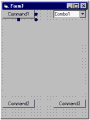
If you wrote on your CE unit (palm version in this case) the few line of
code that you found at the end of the 1st part, running it by NSbasic, you
should see on the screen the following image:
This is a good opportunity to clarify to myself also the ideas i am trying. Starting to program.1
To do this i shall detail herewith how develop a real code's segment of Starting to program.3
an application.
If you wrote on your CE unit (palm version in this case) the few line of
code that you found at the end of the 1st part, running it by NSbasic, you
should see on the screen the following image:
 The remaining missing objects required to be added to
use some more lines of code.
NSbasic supports the objects' array but to get it and to be able to use the
same features that the equal object offer under Visual Basic.
You may use to ways to get the code you need. First see on the NSbasic
handlebook that show a sample using Option Buttons or you may use my
program NSassist that will help you writing the full code for you.
If you do not like the above mentioned ways, you can find herein the
code in question:
Dim Vc,Oc
Vc=20:Oc=0
Dim I,Alabel(4)
For I = 0 to UBOUND(Alabel)
ADDOBJECT "Label","Alabel" & I,0+ ( I * Oc ),84+ ( I * Vc ),50,18
EXECUTE("SET Alabel(" & I & ") = Alabel" & I)
EXECUTE("SUB Alabel"& I &"_Click" _
& vbCrLf & "Alabel_Click("& I &")" _
& vbCrLf &"END SUB")
Alabel( I ).BackColor = vbRed
Alabel( I ).FontBold = True
Alabel( I ).BorderStyle=1
Alabel( I ).Caption=""
Next
You can modify Alabel( I ).Caption to get for each label its own caption.
Obviously by the same way you can use TextBox, CommandButtons,
Option or CheckBox. The only problem with the above code is that you
can display objects by vertical or horizontal line only and in this case all
the objects have the same dimensions.
<<< Tips Index
The remaining missing objects required to be added to
use some more lines of code.
NSbasic supports the objects' array but to get it and to be able to use the
same features that the equal object offer under Visual Basic.
You may use to ways to get the code you need. First see on the NSbasic
handlebook that show a sample using Option Buttons or you may use my
program NSassist that will help you writing the full code for you.
If you do not like the above mentioned ways, you can find herein the
code in question:
Dim Vc,Oc
Vc=20:Oc=0
Dim I,Alabel(4)
For I = 0 to UBOUND(Alabel)
ADDOBJECT "Label","Alabel" & I,0+ ( I * Oc ),84+ ( I * Vc ),50,18
EXECUTE("SET Alabel(" & I & ") = Alabel" & I)
EXECUTE("SUB Alabel"& I &"_Click" _
& vbCrLf & "Alabel_Click("& I &")" _
& vbCrLf &"END SUB")
Alabel( I ).BackColor = vbRed
Alabel( I ).FontBold = True
Alabel( I ).BorderStyle=1
Alabel( I ).Caption=""
Next
You can modify Alabel( I ).Caption to get for each label its own caption.
Obviously by the same way you can use TextBox, CommandButtons,
Option or CheckBox. The only problem with the above code is that you
can display objects by vertical or horizontal line only and in this case all
the objects have the same dimensions.
<<< Tips Index